Finding new customers is a challenge every business faces, whether you’re a solo entrepreneur or a large company. The digital world is crowded, and grabbing the right attention is harder than ever. This is where lead generation tools can make all the difference. These tools help you attract, capture, and organize potential customers—so you can turn interest into sales.
But with so many options, how do you pick the best tool for your business? Some tools focus on finding emails, others help you build landing pages, while some offer all-in-one solutions. Making the right choice can save you time, money, and frustration.
This guide will walk you through the top lead generation tools available today, compare their strengths and weaknesses, and offer practical advice for real-world use.
Whether you’re new to lead generation or want to improve your current process, you’ll find insights here that go beyond the basics. Let’s dive in and discover which tools can help you grow your business in 2026 and beyond.
Most businesses depend on a steady flow of new leads to survive and grow. Traditional methods like cold calls or word-of-mouth still work, but they’re slow and hard to scale. Lead generation tools use automation, data, and smart design to speed up the process.
Here’s what these tools can do for you:
Relying only on manual methods means you’ll miss out on many opportunities. Using the right tool can boost your lead numbers and free up your time for higher-value work.
Not all lead generation tools are equal. Some are simple and cheap, while others have advanced features but may be more complex. Here’s what you should consider before choosing:
Choosing a tool that matches your workflow is more important than picking the one with the most features.
Below is a list of the best lead generation tools that can fit different needs and budgets. Each one offers something unique, so you can find a good match for your goals.
HubSpot is known for its all-in-one marketing, sales, and CRM platform. It’s popular with businesses of all sizes.
Key Features:
Pros:
Cons:
Pricing: Free basic plan; paid plans start at $50/month.
Real-World Use Case: A small SaaS startup uses HubSpot to capture leads from its website, send automated emails, and track which leads are most likely to convert.
LinkedIn Sales Navigator focuses on B2B lead generation. It helps you find decision-makers using LinkedIn’s massive network.
Key Features:
Pros:
Cons:
Pricing: Starts at $99/month.
Real-World Use Case: A B2B consulting firm uses Sales Navigator to find and connect with HR managers in Fortune 500 companies.
OptinMonster is a top tool for creating forms and pop-ups that turn website visitors into leads.
Key Features:
Pros:
Cons:
Pricing: Plans start at $16/month.
Real-World Use Case: An e-commerce site uses OptinMonster to show a discount popup when users try to leave, capturing their email before they go.
Leadpages makes it simple to build high-converting landing pages for collecting leads.
Key Features:
Pros:
Cons:
Pricing: Starts at $37/month.
Real-World Use Case: A digital marketer creates campaign-specific landing pages in minutes, targeting different customer segments.
Intercom offers live chat and messaging tools for real-time lead capture.
Key Features:
Pros:
Cons:
Pricing: Starts at $74/month.
Real-World Use Case: A software company uses Intercom’s chatbot to answer questions and collect emails from website visitors 24/7.
Hunter.io is perfect for finding professional email addresses and verifying them.
Key Features:
Pros:
Cons:
Pricing: Free for 25 searches/month; paid plans from $49/month.
Real-World Use Case: A sales rep uses Hunter.io to build a verified list of potential clients from company websites.
Mailchimp is a well-known email marketing platform with lead capture tools.
Key Features:
Pros:
Cons:
Pricing: Free up to 500 contacts; paid plans start at $13/month.
Real-World Use Case: A blogger uses Mailchimp forms to collect emails and send weekly newsletters to nurture leads.
Pipedrive is a sales-focused CRM with built-in lead generation features.
Key Features:
Pros:
Cons:
Pricing: Starts at $14/month.
Real-World Use Case: A small business uses Pipedrive to capture leads from their website and move them through the sales pipeline easily.
Unbounce is a landing page builder focused on conversion optimization.
Key Features:
Pros:
Cons:
Pricing: Starts at $90/month.
Real-World Use Case: A marketing agency uses Unbounce to test different landing pages for paid ad campaigns.
Sumo offers free and paid tools for growing your email list and traffic.
Key Features:
Pros:
Cons:
Pricing: Free; Pro starts at $39/month.
Real-World Use Case: A blogger adds Sumo pop-ups to grow their email list without technical skills.
Choosing the right tool can be easier with a side-by-side view. Below is a comparison of the top tools for common needs.
| Tool | Best For | Starting Price | Key Features | Free Plan |
|---|---|---|---|---|
| HubSpot | All-in-one, SMBs | $0 | Landing pages, CRM, email, live chat | Yes |
| LinkedIn Sales Navigator | B2B, Sales Teams | $99/mo | Lead search, InMail, CRM sync | No |
| OptinMonster | Website pop-ups | $16/mo | Pop-ups, A/B testing, triggers | No |
| Leadpages | Landing pages | $37/mo | Templates, analytics, payments | No |
| Intercom | Live chat, SaaS | $74/mo | Chatbots, automated lead qual. | No |
| Hunter.io | Email finding | $0 | Email finder, verifier, bulk | Yes |
| Mailchimp | Email marketing | $0 | Forms, automation, analytics | Yes |
| Pipedrive | Sales CRM | $14/mo | Web forms, pipeline, chatbot | No |
| Unbounce | Conversion landing pages | $90/mo | Smart Traffic, A/B testing | No |
| Sumo | Simple list building | $0 | Pop-ups, sharing, analytics | Yes |
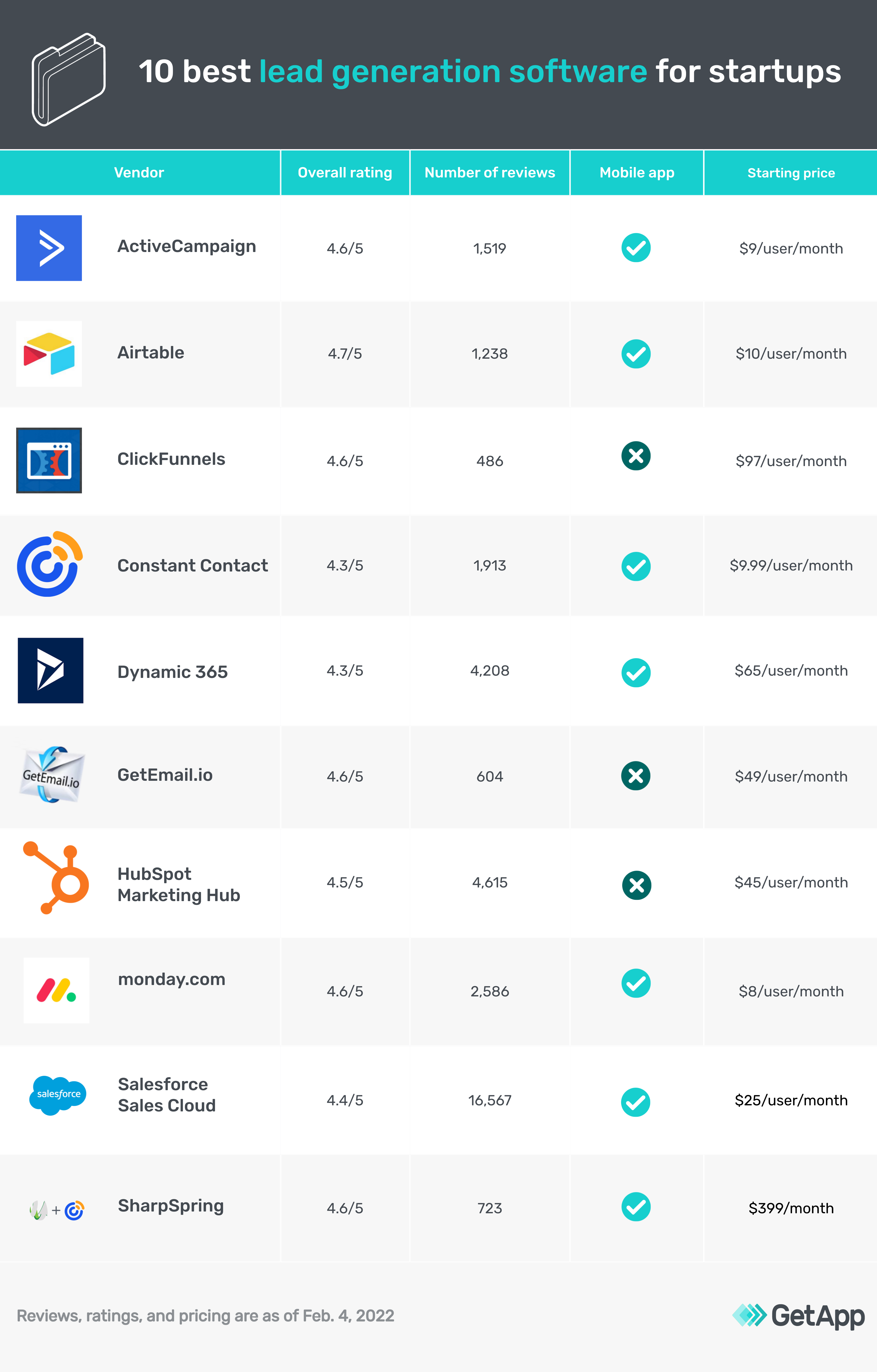
Credit: www.getapp.com
Let’s look closer at what makes each tool shine—and where they might fall short.
Pros:
Cons:
Pros:
Cons:
Pros:
Cons:
Pros:
Cons:
Pros:
Cons:
Pros:
Cons:
Pros:
Cons:
Pros:
Cons:
Pros:
Cons:
Pros:
Cons:
Pricing varies widely based on features and scale. Here’s a simple side-by-side look at entry-level pricing.
| Tool | Free Plan | Lowest Paid Plan | Notes |
|---|---|---|---|
| HubSpot | Yes | $50/mo | Advanced features cost more |
| LinkedIn Sales Navigator | No | $99/mo | High-quality B2B leads |
| OptinMonster | No | $16/mo | Core features in lower tiers |
| Leadpages | No | $37/mo | Includes landing page builder |
| Intercom | No | $74/mo | Custom plans for larger teams |
| Hunter.io | Yes | $49/mo | Free for light users |
| Mailchimp | Yes | $13/mo | Free for up to 500 contacts |
| Pipedrive | No | $14/mo | CRM with lead capture |
| Unbounce | No | $90/mo | AI-powered landing pages |
| Sumo | Yes | $39/mo | Branding removed on Pro plan |
Credit: adoric.com
Understanding how businesses use these tools can help you decide what fits your needs.
A common mistake is to copy what large companies do without considering your budget or technical skill. Start small, test what works, and scale up.
Many beginners focus only on collecting as many leads as possible. But quality matters more than quantity. A list of 100 well-targeted leads is often better than 1,000 random emails. Use the targeting and filtering options in your tool to focus on the right audience.
Another common mistake is ignoring follow-up automation. If you don’t contact leads quickly, they lose interest. Tools like HubSpot, Intercom, and Mailchimp can send instant replies or drip emails—making sure no opportunity is missed.
Also, remember that integration is critical. Your lead generation tool should connect smoothly with your CRM, email, or sales software. Manual data entry wastes time and leads to errors.
Here’s a step-by-step approach for picking the right tool:
Tip: Don’t be afraid to switch tools if your first choice doesn’t deliver. The right fit makes a big difference in your results.
If you’re just starting or have a small business, HubSpot or Mailchimp are safe bets. They’re easy, offer free plans, and scale as you grow.
For B2B sales, LinkedIn Sales Navigator is hard to beat—though it’s not cheap. For e-commerce and bloggers, OptinMonster or Sumo can quickly boost your email list.
If your business relies on landing pages, Leadpages and Unbounce offer powerful features and templates to convert visitors.
For finding and verifying emails, Hunter.io is simple and effective. For companies wanting to automate live chat and lead qualification, Intercom stands out.
Your needs might change as you grow. Start simple, measure results, and only upgrade when you need more features. For deeper research, check official reviews and case studies on trusted sites like G2.

Credit: www.youtube.com
A lead generation tool helps businesses find, capture, and organize contact information from potential customers. It automates tasks like collecting emails, qualifying leads, and following up—so you can focus on closing sales.
Yes, many free tools like Sumo and Mailchimp work well for small businesses or beginners. However, paid tools often offer better features and support as you grow.
Most top tools connect with popular CRM (Customer Relationship Management) and email services. Look for tools that offer easy integration with your existing stack to avoid manual work.
LinkedIn Sales Navigator is the top choice for B2B, thanks to its deep LinkedIn data and advanced search. HubSpot is also strong for B2B, especially when paired with LinkedIn.
Yes, many businesses use multiple tools. For example, you might use Hunter.io to find emails, OptinMonster for website pop-ups, and Mailchimp for email automation. Just make sure they integrate well to avoid confusion.
Finding the right lead generation tools is an investment in your business’s future. Focus on quality, automation, and integration—and you’ll set yourself up for growth in the years ahead.
