

Ai Website Design Tools
Building a website used to be a long, technical process. Today, AI website design tools are changing everything. With just a few clicks, anyone—designer or not—can create attractive, professional websites. These tools are more than just templates; they use artificial intelligence to suggest layouts, write content, and even improve designs as you work. This big shift is making web design faster, easier, and more creative for everyone.
Why is this so important now? In 2024, over 70% of small businesses need an online presence, but many struggle with costs and technical skills. AI tools are closing this gap. The best part: these platforms are not just for experts. Bloggers, shop owners, and freelancers are using them to launch sites in hours instead of weeks.
But which tools are leading the way? What features matter most? Are there hidden limitations? This guide will help you understand the top AI website design tools, their real-world uses, how they compare, and what to watch out for as you choose the best solution.
What Are Ai Website Design Tools?
AI website design tools use artificial intelligence to help you build and manage websites. Instead of coding everything yourself or relying on fixed templates, these platforms make smart suggestions. They might recommend colors, layouts, or even write text for you. Some tools go further, letting you describe your business and generating a site automatically.
The main benefit is speed. With AI, you can have a working website in minutes. The tools often include drag-and-drop editors, automatic image resizing, SEO tips, and mobile-friendly adjustments. As you work, the AI learns your style and improves suggestions.
Non-obvious insight: Many AI tools now integrate with other business software—like online stores, booking systems, or social media—making management easier from one dashboard.
Key Features To Expect
When comparing AI website design tools, look for these core features:
- AI-powered site builder: Creates layout and structure based on your input.
- Content generation: Writes headlines, product descriptions, or blog posts.
- Design suggestions: Recommends colors, fonts, and images.
- SEO optimization: Offers tips to improve Google ranking.
- Responsive design: Ensures your site looks good on mobile and desktop.
- Third-party integrations: Connects with tools like Shopify, Mailchimp, or Google Analytics.
- E-commerce support: Lets you sell products or services.
- Custom code options: For advanced users who want more control.
Many tools offer these, but the quality and ease of use vary. Some platforms focus on speed, while others give more design freedom.
Practical tip: Before choosing a tool, try out the demo or free plan. See if the AI suggestions actually match your style and needs.

Credit: designmodo.com
Top Ai Website Design Tools Compared
To make your decision easier, here’s a direct comparison of leading AI website design tools as of 2024:
| Tool | Best For | AI Capabilities | Ease of Use | Starting Price | Free Plan | Notable Limitations |
|---|---|---|---|---|---|---|
| Wix ADI | Small businesses, beginners | Layout, text, images | Very Easy | $16/mo | Yes | Limited custom code |
| Zyro | Startups, portfolios | Content, logo, layout | Easy | $2.99/mo | No | Few advanced apps |
| Bookmark AiDA | Service businesses | Full site generation | Very Easy | $11.99/mo | Yes (limited) | Basic e-commerce |
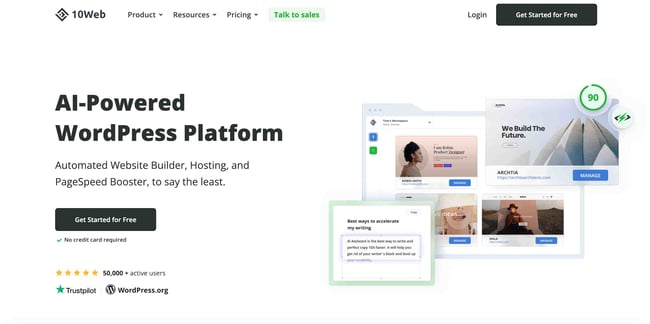
| 10Web | WordPress users | Clone, generate, optimize | Moderate | $10/mo | Yes (trial) | Requires WP knowledge |
| Hostinger Website Builder | Budget users, freelancers | Text, design, logo | Easy | $2.99/mo | No | Limited apps |
| Framer AI | Agencies, designers | Text-to-site, animation | Moderate | $5/mo | Yes | Learning curve |
Non-obvious insight: Even the best AI can’t read your mind—be ready to tweak layouts and content for a truly unique site.
Detailed Reviews: Pros, Cons, And Pricing
Wix Adi
Wix ADI (Artificial Design Intelligence) is one of the most popular AI website design tools. It asks a few questions about your business, then builds a site with text, images, and color schemes.
Pros:
- Extremely simple for beginners
- Huge app marketplace
- Good SEO options
Cons:
- Less flexible for developers
- Some advanced features require the classic Wix editor
Pricing: Starts at $16/month for a basic site with AI features. Free plan available (includes Wix ads).
Real-world use case: A local bakery used Wix ADI to launch a website in two hours, including an online menu and order form—no developer needed.
Zyro
Zyro is known for its clean layouts and fast setup. Its AI tools help write headlines, generate logos, and even suggest images.
Pros:
- Very affordable
- Fast site generation
- AI logo and slogan maker
Cons:
- Fewer integrations than bigger platforms
- Limited advanced design options
Pricing: Starts at $2.99/month, no free plan but offers a 30-day money-back guarantee.
Real-world use case: Freelancers often use Zyro to create quick portfolio sites, showcasing work with AI-generated content.
Bookmark Aida
AiDA (Artificial Intelligence Design Assistant) by Bookmark builds websites after you describe your business. It can make new sections or entire pages with AI.
Pros:
- Builds pages in minutes
- User-friendly dashboard
- Free plan for testing
Cons:
- Basic e-commerce only
- Less control over advanced design
Pricing: Pro plan starts at $11.99/month. Free plan has basic features.
Real-world use case: Service businesses, like cleaning companies, use Bookmark to quickly update service lists and contact info.
10web
10Web is unique—it brings AI to WordPress. You can clone any site, generate pages, or optimize images and SEO with AI.
Pros:
- Works with WordPress (flexible)
- Clone competitor sites
- Automatic SEO improvements
Cons:
- Requires some WordPress knowledge
- Slight learning curve for beginners
Pricing: Starts at $10/month. Free trial for new users.
Real-world use case: Agencies use 10Web to migrate old sites to WordPress, saving time with AI-generated content and layouts.
Hostinger Website Builder
Hostinger’s tool is budget-friendly and uses AI to suggest designs, write text, and even create logos.
Pros:
- Low cost
- Fast setup
- Includes free domain for 1 year (with some plans)
Cons:
- Fewer third-party apps
- Not as customizable as Wix or WordPress
Pricing: Starts at $2.99/month, billed annually. No free plan, but affordable for most users.
Real-world use case: Freelancers use Hostinger for personal blogs and landing pages, getting online fast without much technical skill.
Framer Ai
Framer uses advanced AI to turn text prompts into fully designed sites. It supports animations and interactive elements.
Pros:
- Text-to-website generation
- Modern, stylish templates
- Good for agencies and designers
Cons:
- Takes time to master
- Some features are premium only
Pricing: Starts at $5/month for personal use. Free plan with Framer branding.
Real-world use case: Design agencies use Framer to build prototypes for clients, saving hours on mockups.
How Ai Website Builders Work
AI website builders start by asking questions: What is your business? What style do you like? Who is your audience? Based on your answers, the tool picks layouts, writes text, and suggests images.
Some platforms let you type a short description, like “I need a portfolio for a photographer in New York. ” The AI then builds the site structure and fills in content. You can edit everything—text, colors, images—after the AI creates the first version.
Practical example: A yoga instructor can describe her services, and the AI will create a website with class schedules, contact forms, and a photo gallery.
Common mistake: Relying completely on AI-generated text. Always review and update content to match your voice and branding.
Data Table: Ai Feature Comparison
Here’s a closer look at how each tool’s AI features compare:
| Tool | AI Content Writing | AI Design Suggestions | Automatic SEO | AI Image Tools |
|---|---|---|---|---|
| Wix ADI | Yes | Yes | Yes | No |
| Zyro | Yes | Yes | No | Logo Maker |
| Bookmark AiDA | Yes | Yes | Yes | No |
| 10Web | Yes | Yes | Yes | Yes |
| Hostinger | Yes | Yes | No | Logo Maker |
| Framer AI | Yes | Yes | No | No |
Key Factors When Choosing An Ai Website Design Tool
Choosing the right tool depends on your goals and skills. Think about:
- Your experience level: Beginners may prefer Wix ADI or Hostinger; designers might like Framer.
- Budget: Some tools are very affordable, but advanced features may cost more.
- E-commerce needs: Not all AI builders support online stores.
- Customization: If you want full design control, check for custom code options.
- Support and community: Look for platforms with good tutorials and helpful support.
Non-obvious insight: Some AI tools offer unique features like image resizing, logo generation, or even social media post creation. These extras can save time on branding.
Real-world Use Cases
1. Small business launch: A coffee shop owner uses Bookmark AiDA to create a site, menu, and contact page in one afternoon. Updates are easy—no coding needed.
2. Freelancer portfolio: Designers use Zyro or Framer to show off work, with AI-generated descriptions and smart image layouts.
3. E-commerce startup: A craft seller picks Wix ADI, which sets up a shop with product pages and payment options. AI helps write catchy product titles.
4. Nonprofit landing page: Hostinger’s builder helps a charity get online fast, using AI to generate donation calls-to-action.
5. Agency prototyping: 10Web lets agencies clone and redesign old client sites, saving hours with AI-generated content.
Pro tip: Try several tools with free trials before committing. Your workflow and needs will guide you to the right platform.
Common Challenges And Solutions
Challenge: Content Feels Generic
Solution: Edit AI-generated text for personality. Use your own stories or testimonials. AI saves time, but your personal touch makes the site unique.
Challenge: Limited Customization
Solution: Look for platforms that allow switching to manual editing or adding custom code. If you want full control, 10Web (WordPress) or Framer may be better.
Challenge: Seo Performance
Solution: Use the AI’s SEO suggestions, but always check them. Write unique titles and descriptions for your pages. Remember: real human content ranks better on Google.
Non-obvious tip: Images matter for SEO. Use alt text and compress images for faster load times—many AI tools can help with this.
Pricing And Value
It’s important to look beyond just the monthly price. Consider:
- Hosting: Is it included?
- Domain name: Some plans offer a free domain for the first year.
- App marketplace: Can you add extra features later?
- Support: Is there live chat or only email?
Here’s a quick summary:
| Tool | Monthly Price | Hosting Included | Custom Domain | Support Options |
|---|---|---|---|---|
| Wix ADI | $16 | Yes | Yes (paid plan) | Live chat, email |
| Zyro | $2.99 | Yes | Yes | Email, tutorials |
| Bookmark AiDA | $11.99 | Yes | Yes | Email, chat |
| 10Web | $10 | Yes | Yes | Email, live chat |
| Hostinger | $2.99 | Yes | Yes (with plan) | 24/7 chat |
| Framer AI | $5 | Yes | Yes | Docs, chat |
Practical tip: Watch for renewal prices—some platforms increase costs after the first year.


Credit: procreator.design
Expert Recommendations
- For absolute beginners, start with Wix ADI or Hostinger. The AI does most of the work, and support is solid.
- For designers or agencies, Framer or 10Web offer more control and flexibility.
- If you need a fast, low-cost launch, Zyro or Hostinger are strong choices.
- For WordPress fans, 10Web brings AI speed to the world’s most popular CMS.
- For service businesses, Bookmark’s AiDA makes updating services or hours simple.
Pro tip: AI website design tools are not magic—review everything before publishing. Your input is still the secret to a standout site.
The Future Of Ai In Website Design
AI website design is growing fast. In the next few years, expect:
- More advanced content generation: AI will write longer, better articles and even create video content.
- Personalized user experiences: Sites will adjust colors, layouts, and offers based on who’s visiting.
- Voice and chat integration: AI chatbots will answer questions and guide visitors automatically.
- Better SEO automation: AI will help you rank higher with real-time keyword and content suggestions.
Non-obvious insight: As AI gets better, the skill needed will shift from technical coding to creative direction and content editing.

Credit: blog.hubspot.com
Frequently Asked Questions
What Are The Main Benefits Of Using Ai Website Design Tools?
AI tools save time, reduce costs, and make web design accessible for everyone. They suggest layouts, write content, and even help with SEO, so you can focus on your business instead of technical details.
Can I Customize My Site After The Ai Builds It?
Yes. Most platforms let you change everything—text, colors, images, and layout. Some, like 10Web and Framer, offer even more control for advanced users.
Are Ai Website Builders Good For Seo?
Many AI builders include SEO tools or suggestions. However, you still need to add unique titles, descriptions, and content for the best results. Use the AI as a helper, not a replacement.
How Secure Are Ai-built Websites?
Security depends on the platform. Reputable tools like Wix, 10Web, and Hostinger offer SSL certificates, regular updates, and secure hosting. Always choose a trusted provider.
Where Can I Learn More About Ai In Web Design?
You can find helpful information and recent research on the Wikipedia page for artificial intelligence.
Final Thoughts
AI website design tools are making it easier than ever to launch a professional website. Whether you’re a small business owner, designer, or just want to share your story, these platforms offer speed, creativity, and new possibilities. The right tool depends on your budget, experience, and goals—but with so many smart options, building your site in 2024 is faster and simpler than ever.
Ready to try it for yourself? Choose a tool from this guide, test the features, and start building your online presence today. Your website—and your audience—are just a few clicks away.