

Building a website today is nothing like it was ten years ago. You no longer need to know coding or hire expensive designers. Ai website design tools have changed the game, making web design faster, easier, and smarter. Whether you run a small business, want to start a blog, or manage a portfolio, these tools can help you create a beautiful site in just hours.
This article explores the world of Ai website design tools. You’ll learn how they work, which ones are the best, and how to choose the right tool for your needs. We’ll look at real examples, compare features, and reveal tips even most beginners miss. If you want a website that stands out, but don’t know where to begin, you’re in the right place.
What Are Ai Website Design Tools?
Ai website design tools use artificial intelligence to help people build websites. These tools don’t just offer templates. They analyze your needs, suggest layouts, pick colors, and even write text. The goal is to make web design fast and easy for everyone.
You usually start by answering a few questions. The tool then suggests a design, which you can adjust. Some tools let you change things with simple clicks, while others offer deeper control. Ai can also help with SEO, making your site more visible on Google.
Many Ai tools learn from millions of websites. They use this data to suggest layouts that work well, avoid mistakes, and help you make smart design choices.
Why Ai Is Changing Website Design
The rise of Ai website design tools is not just a trend. It’s a shift in how websites are made. Here’s why Ai is making such a big impact:
- Speed: Ai cuts design time from weeks to hours.
- Cost: You save money by avoiding expensive designers.
- Customization: Ai adapts designs to your brand and needs.
- SEO Help: Some tools optimize your site for search engines automatically.
- Ease of Use: No coding skills needed.
Ai tools are also improving every year. As they learn from more sites, their suggestions get better. This means even beginners can create websites that look professional.
Top Ai Website Design Tools In 2026
Let’s look at some of the best Ai website design tools available. Each tool offers unique features, pricing, and strengths. Here’s a detailed comparison to help you choose.
| Tool Name | Main Feature | Ease of Use | Pricing | Best For |
|---|---|---|---|---|
| Wix ADI | Automatic site creation | Very easy | Starts at $16/month | Small businesses, blogs |
| Zyro | Ai content & layout | Easy | Starts at $2.90/month | Portfolios, stores |
| Bookmark | Aida Ai designer | Easy | Starts at $11.99/month | Service sites |
| Squarespace Ai | Ai template suggestions | Moderate | Starts at $16/month | Creative projects |
| Framer Ai | Ai site generation | Very easy | Starts at $12/month | Landing pages |
| Jimdo Creator | Ai-powered website builder | Easy | Starts at $9/month | Personal sites |
| 10Web | WordPress Ai builder | Moderate | Starts at $10/month | WordPress users |
| Webflow Ai | Ai design suggestions | Moderate | Starts at $18/month | Advanced design |
Wix Adi
Wix ADI (Artificial Design Intelligence) is a leader in Ai website design. You answer a few questions, and it builds your site in minutes. It chooses layouts, colors, and even adds text.
Pros:
- Fast site creation
- Simple interface
- Good SEO support
Cons:
- Limited customization compared to full Wix editor
- Some features hidden behind higher plans
Pricing: Starts at $16/month. Free plan available, but with ads.
Real-World Use Case: A small bakery used Wix ADI to launch an online ordering website in one day. They saved money and grew sales by 30% in the first month.
Zyro
Zyro uses Ai for both design and content. It offers Ai tools for writing, layout, and image editing. It’s one of the most affordable options.
Pros:
- Very low price
- Ai for content generation
- Fast, clean templates
Cons:
- Limited advanced design options
- Smaller app store
Pricing: Starts at $2.90/month.
Real-World Use Case: A freelance photographer built a portfolio site in two hours using Zyro. The Ai suggested a layout and wrote text, helping him focus on his work.
Bookmark
Bookmark’s Aida Ai designer builds sites based on your answers. It’s focused on speed and simplicity. You can edit your site after creation.
Pros:
- Fast setup
- Simple editing
- Responsive designs
Cons:
- Some features are basic
- Limited integrations
Pricing: Starts at $11.99/month.
Real-World Use Case: A local plumber used Bookmark to create a service site. He got more clients after his site ranked higher in search.
Squarespace Ai
Squarespace now offers Ai-powered template suggestions. It helps you pick the right design for your needs and suggests layouts.
Pros:
- High-quality templates
- Good Ai suggestions
- Strong marketing tools
Cons:
- Steeper learning curve
- Higher price
Pricing: Starts at $16/month.
Real-World Use Case: An artist used Squarespace Ai to launch an online gallery. The site looked professional, and she sold more art pieces.
Framer Ai
Framer Ai creates landing pages and websites from simple prompts. You describe what you want, and it builds the site.
Pros:
- Fast, easy site generation
- Good for landing pages
- Modern designs
Cons:
- Limited to simple sites
- Not ideal for large stores
Pricing: Starts at $12/month.
Real-World Use Case: A startup used Framer Ai to build a product landing page. They launched in one day and got 500 signups.
Jimdo Creator
Jimdo’s Ai-powered creator is great for personal and small business sites. It asks a few questions and builds your site.
Pros:
- Simple setup
- Good for beginners
- Affordable
Cons:
- Fewer customization options
- Limited e-commerce features
Pricing: Starts at $9/month.
Real-World Use Case: A teacher created a class website with Jimdo in two hours, saving time and improving communication with parents.
10web
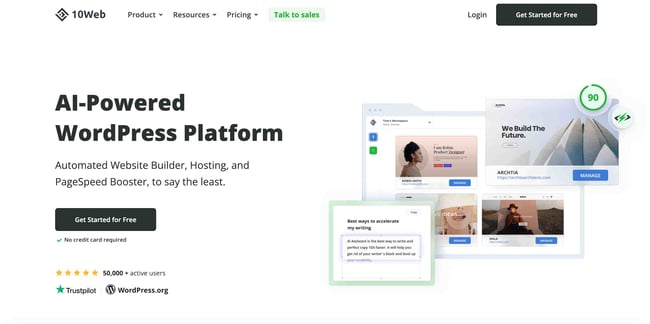
10Web uses Ai to build WordPress sites. It can copy other sites and turn them into WordPress pages.
Pros:
- Works with WordPress
- Ai site copying
- Good for advanced users
Cons:
- Higher learning curve
- Requires WordPress hosting
Pricing: Starts at $10/month.
Real-World Use Case: An agency used 10Web to migrate client sites to WordPress, saving days of manual work.
Webflow Ai
Webflow Ai helps designers with layout suggestions and smarter editing. It’s for users who want more control.
Pros:
- Advanced design tools
- Ai-powered suggestions
- Flexible layouts
Cons:
- Not for total beginners
- Higher price
Pricing: Starts at $18/month.
Real-World Use Case: A web designer used Webflow Ai to speed up client projects, finishing sites 40% faster.
How Ai Website Design Works
Ai website design tools use machine learning and data. Here’s a simple breakdown:
- Input: You give information about your business, style, and goals.
- Analysis: Ai studies similar websites, trends, and best practices.
- Design Generation: The tool creates a layout, picks colors, and suggests content.
- User Editing: You can adjust the design, add your own text, or change images.
- SEO Optimization: Some tools add keywords, meta tags, and improve loading speed.
Ai does not just guess. It uses data from millions of sites to make smart choices. This makes your site more likely to look good and perform well.
Comparing Ai Website Design Tools: Features And Differences
Choosing the right tool depends on your needs. Let’s compare the main features side by side.
| Tool | Ai Content Writing | SEO Help | Template Quality | App Integrations | Customization |
|---|---|---|---|---|---|
| Wix ADI | Yes | Strong | Good | Wide | Moderate |
| Zyro | Yes | Basic | Clean | Limited | Basic |
| Bookmark | No | Moderate | Responsive | Limited | Basic |
| Squarespace Ai | No | Strong | Excellent | Wide | Advanced |
| Framer Ai | No | Moderate | Modern | Limited | Basic |
| Jimdo Creator | No | Basic | Simple | Limited | Basic |
| 10Web | Yes | Strong | Good | Wide (WordPress) | Advanced |
| Webflow Ai | No | Strong | Excellent | Wide | Advanced |
Non-obvious insight: Some tools, like 10Web, can turn any website into a WordPress site using Ai. This is useful for agencies or anyone who wants to migrate sites quickly.
Another insight: Ai content writing is not always good for every site. If your brand needs a unique voice, you may want to edit Ai-generated text.
Pricing: How Much Do Ai Website Design Tools Cost?
Pricing is important for most users. Ai website design tools range from free to $20/month, with extra fees for advanced features.
- Wix ADI: Free plan with ads. Paid plans start at $16/month.
- Zyro: Starts at $2.90/month. No free plan.
- Bookmark: Starts at $11.99/month.
- Squarespace Ai: Starts at $16/month. No free plan.
- Framer Ai: Starts at $12/month. Limited free version.
- Jimdo Creator: Starts at $9/month. Free version available.
- 10Web: Starts at $10/month.
- Webflow Ai: Starts at $18/month.
Most tools offer discounts for yearly plans. Some offer a free trial, but full features are often behind a paywall.
Common mistake: Many beginners pick the cheapest tool, but later find they need features only available in higher plans. Always check what’s included before paying.
Real-world Use Cases: How People Use Ai Website Design Tools
Ai website design tools are used by many types of people and businesses. Here are real examples:
- Small Business Owners: Launch online stores, booking sites, or service pages in days instead of weeks.
- Freelancers and Creatives: Create portfolios, galleries, or resume sites without coding.
- Nonprofits: Build donation sites or event pages quickly, saving money for their cause.
- Agencies: Speed up client projects, migrate sites, and offer fast solutions.
- Teachers and Schools: Set up class pages, share resources, and communicate with parents.
Example: A small gym used Wix ADI to build a booking site. Members could book classes online, and the gym owner managed everything from one dashboard.
Another example: An NGO used Zyro to launch a fundraising site. The Ai wrote content and suggested layouts, helping them raise money faster.
Common Mistakes Beginners Make
When using Ai website design tools, beginners often:
- Choose the wrong tool for their needs. Not all Ai builders are equal.
- Ignore SEO. Ai can help, but you still need to add good keywords.
- Use Ai-generated content without editing. This can make your site sound generic.
- Forget about mobile design. Always check how your site looks on phones.
- Skip backups. Some tools don’t save changes automatically.
Pro tip: Always preview your site on different devices, and edit Ai-generated text to match your brand voice.
Expert Recommendations: Picking The Right Ai Website Design Tool
Choosing the best tool depends on your goals. Here’s what experts suggest:
- If you want speed and ease, Wix ADI or Framer Ai are good choices.
- For low cost, Zyro offers Ai and affordable plans.
- If you need advanced design, try Webflow Ai or Squarespace Ai.
- WordPress users should look at 10Web.
- For simple sites, Jimdo Creator or Bookmark are easy to use.
Key factors to compare:
- Ease of use: If you’re a beginner, pick a tool with simple editing.
- Customization: If you want unique designs, choose tools with advanced options.
- SEO features: Make sure your tool helps with search rankings.
- Pricing: Check if the features you need are included in the plan.
Another expert tip: Look for tools that offer Ai content writing and SEO optimization. This saves time and makes your site more effective.
Ai Website Design For Seo
Ai website design tools can help your site rank higher on Google. Here’s how:
- Ai content writing: Some tools suggest keywords and write SEO-friendly text.
- Meta tags: Ai can add meta titles and descriptions automatically.
- Fast loading: Ai chooses layouts that load quickly, which is important for ranking.
- Mobile optimization: Most Ai tools create responsive designs for phones and tablets.
But Ai is not perfect. You still need to check your site’s SEO. Add your own keywords, write unique text, and make sure your site is easy to use.
Example: A local restaurant used Ai to build a site with good SEO. They added their own keywords, and the site ranked higher in Google searches.
Non-obvious Insights Most Beginners Miss
Many beginners think Ai website design tools do everything. But:
- Ai does not replace creativity: You still need to choose images, write unique text, and add your brand touch.
- Ai suggestions are based on trends: Sometimes, your site needs to stand out. Don’t follow Ai advice blindly.
- Integrations matter: Some Ai tools don’t connect well with email, analytics, or social media. Always check integrations.
Another insight: Ai can help you make quick changes. If your business changes, you can update your site in minutes, not days.
Pros And Cons Of Ai Website Design Tools
Let’s break down the main advantages and disadvantages.
Pros:
- Fast site creation
- No coding needed
- Affordable pricing
- Good for beginners
- Ai content writing and SEO help
Cons:
- Limited customization in some tools
- Ai-generated content may sound generic
- Advanced features often cost extra
- Not all tools support e-commerce
Expert opinion: Ai website design tools are best for small businesses, personal sites, and quick projects. For large, complex sites, you may still need a designer.


Credit: procreator.design
What Makes A Good Ai Website Design Tool?
A good Ai website design tool should offer:
- User-friendly interface
- Smart Ai suggestions
- Responsive templates
- SEO support
- Affordable pricing
- Customization options
- Integrations with apps
Example: Wix ADI offers a simple interface, strong Ai, and many integrations. It’s popular because it balances speed and flexibility.
Ai Website Design Vs Traditional Website Design
Here’s a simple comparison:
| Feature | Ai Website Design | Traditional Design |
|---|---|---|
| Speed | Hours | Weeks |
| Cost | Low ($3-$20/month) | High ($500-$5000+) |
| Customization | Moderate | High |
| Skill Needed | Beginner | Designer/coder |
| SEO Support | Ai-powered | Manual |
| Updates | Easy | Manual |
Summary: Ai website design tools are best for fast, affordable sites. Traditional design is better for complex, unique projects.

Credit: designmodo.com
Future Of Ai Website Design Tools
Ai is evolving quickly. In the next few years, expect:
- Smarter design suggestions: Ai will learn from more sites and offer better layouts.
- Deeper customization: Ai will let you change more details easily.
- More integrations: Ai tools will connect with more apps, making websites more powerful.
- Better SEO: Ai will offer stronger SEO help, making sites rank higher.
Non-obvious insight: Ai may soon help with website accessibility, making sites easier for everyone to use.
For more on Ai trends, see Wired Magazine.
Frequently Asked Questions
What Is An Ai Website Design Tool?
An Ai website design tool uses artificial intelligence to help build websites. It suggests layouts, writes content, and makes design choices based on your needs.
Are Ai Website Design Tools Good For E-commerce?
Some Ai tools offer e-commerce features, but not all. Wix ADI and Squarespace Ai support stores, while others like Framer Ai focus on simple sites.
Do I Need To Know Coding To Use Ai Website Design Tools?
No coding is needed. Most tools use simple drag-and-drop interfaces, making them easy for beginners.
How Do Ai Tools Help With Seo?
Ai tools suggest keywords, write SEO-friendly text, add meta tags, and improve site speed. But you should still add your own keywords and check SEO settings.
Can I Edit Ai-generated Content?
Yes, you can and should edit Ai-generated text to match your brand and voice. This makes your site unique and more effective.

Credit: blog.hubspot.com
Final Thoughts
Ai website design tools make building a website fast, easy, and affordable. Whether you’re starting a blog, launching a store, or promoting your business, these tools can help you get online in hours. Remember to compare features, check pricing, and edit Ai suggestions to match your brand.
If you want a site that looks professional without hiring a designer, try one of the tools discussed above. As Ai evolves, these tools will only get better. Take your first step today—your perfect website is just a few clicks away.