

Blogging has become one of the most popular ways to share ideas, build a brand, and even make money online. WordPress remains the top platform for bloggers because it is flexible, easy to use, and supports a huge range of plugins.
But with thousands of plugins available, it can be confusing to choose the right ones. The right plugins can help you write better posts, grow traffic, protect your site, and earn more. The wrong plugins can slow your website, cause problems, or make blogging harder.
This guide is designed for bloggers, freelancers, small business owners, and anyone using WordPress to publish content. You’ll learn which plugins are best for blogging, what features matter most, and how to avoid common mistakes. Each plugin is explained simply so even beginners can understand. You’ll also see practical comparisons, real examples, and expert recommendations to help you make smart choices. By the end, you’ll know exactly which tools can take your blog to the next level.
Why Plugins Matter For Bloggers
WordPress plugins are small programs that add new features to your website. For bloggers, plugins can do things like:
- Improve writing and editing
- Speed up your website
- Block spam and hackers
- Make your site look better
- Help people find your blog in Google
- Grow your email list or social followers
- Earn money from ads or sales
Plugins save time and make blogging easier. But too many plugins, or the wrong ones, can create problems. It’s better to use a few high-quality plugins than install everything you see.
How To Choose The Best WordPress Plugins
When choosing plugins, keep these points in mind:
- Purpose: What problem does the plugin solve? Only install plugins you really need.
- Reputation: Look for plugins with good reviews and regular updates.
- Speed: Some plugins slow down your site. Choose lightweight options.
- Support: Good plugins offer support and documentation.
- Compatibility: Make sure the plugin works with your WordPress version and other plugins.
Many new bloggers forget to check plugin ratings and updates. This can lead to security risks or broken websites. It’s also common to install too many plugins, which can make your site slow. Always test new plugins on a staging site if possible.


Credit: www.reamaze.com
Must-have WordPress Plugins For Bloggers
Let’s explore the essential plugins every blogger should consider. These plugins cover the most important blogging tasks, from SEO to security to content creation.
1. Yoast Seo
Yoast SEO is the most popular SEO plugin for WordPress. It helps you optimize your posts for Google, gives you clear suggestions, and makes technical SEO simple.
Features:
- On-page SEO guidance
- Readability checks
- Meta tags and sitemaps
- Social media integration
Pros:
- Easy for beginners
- Regular updates
- Free version covers most needs
Cons:
- Some advanced tools only in premium version
Pricing: Free, Premium starts at $99/year
Many bloggers miss the importance of readability scores. Yoast’s readability check helps you write posts that are easy for visitors to understand, which can boost time-on-site and SEO.
2. Akismet Anti-spam
Spam comments can ruin your blog and waste your time. Akismet filters out spam automatically and keeps your comments section clean.
Features:
- Automatic spam detection
- Easy setup
- Works with most comment plugins
Pros:
- Reliable and fast
- Reduces manual moderation
Cons:
- Some false positives
- Paid plans for commercial sites
Pricing: Free for personal use, starts at $10/month for businesses
New bloggers often think spam isn’t a big problem, but as your site grows, spam can overwhelm you. Akismet solves this before it becomes an issue.
3. Wpforms
WPForms lets you create contact forms, surveys, and newsletter signups without coding. It’s one of the most user-friendly form plugins.
Features:
- Drag-and-drop builder
- Templates for contact, feedback, surveys
- Integrates with email services
Pros:
- Fast setup
- Mobile-friendly forms
- Good support
Cons:
- Some advanced features only in paid version
Pricing: Free (Lite), paid plans start at $39.50/year
A practical tip: Always add a contact form to your blog. It makes you look professional and encourages readers or brands to reach out.
4. Jetpack
Jetpack is a multi-purpose plugin from WordPress.com. It offers security, backups, site stats, and more in one package.
Features:
- Site analytics
- Security scanning
- Automated backups
- Social sharing
Pros:
- All-in-one solution
- Regular updates
- Good for beginners
Cons:
- Can slow down small sites
- Some features require paid plan
Pricing: Free, paid features start at $4/month
Jetpack’s site stats are basic but helpful for beginners. As your blog grows, consider using Google Analytics for deeper data.
5. Monsterinsights
MonsterInsights connects Google Analytics to your WordPress site. It makes tracking visitors simple and shows clear reports in your dashboard.
Features:
- Google Analytics integration
- Easy setup
- Custom reports
Pros:
- No coding needed
- User-friendly dashboard
- Helpful for content planning
Cons:
- Some reports only in paid version
Pricing: Free, premium starts at $99.50/year
Many bloggers struggle with analytics setup. MonsterInsights solves this, so you can see which posts perform best and plan your content.
6. Rank Math
Rank Math is another popular SEO plugin. It’s newer than Yoast but offers more features for free.
Features:
- Advanced SEO tools
- Rich snippet support
- Keyword tracking
Pros:
- Free for most features
- Fast and lightweight
- Easy migration from other SEO plugins
Cons:
- Can be complex for beginners
Pricing: Free, Pro starts at $59/year
If you’re deciding between Yoast and Rank Math, use the comparison below:
| Feature | Yoast SEO | Rank Math |
|---|---|---|
| Free Keyword Optimization | 1 keyword | Multiple keywords |
| Schema Integration | Paid | Free |
| Readability Analysis | Included | Included |
| Ease of Use | Very Easy | Easy |
| Price (Premium) | $99/year | $59/year |
7. Elementor
Elementor is a drag-and-drop page builder. It lets you design beautiful blog pages without coding.
Features:
- Live editor
- Responsive design
- Templates and widgets
Pros:
- Beginner-friendly
- Fast design workflow
- Free version is powerful
Cons:
- Large sites may need paid version
- Can conflict with some themes
Pricing: Free, Pro starts at $59/year
If you want your blog to stand out visually, Elementor is a good choice. Many bloggers use it to create custom landing pages or about pages.
8. Smush
Images can slow down your blog. Smush compresses images automatically so your site loads faster.
Features:
- Automatic image compression
- Bulk smush
- Lazy loading
Pros:
- Easy setup
- Improves speed
- No quality loss
Cons:
- Free version limits bulk actions
Pricing: Free, Pro starts at $60/year
Fast sites rank better in Google and keep visitors happy. Smush is a simple way to speed up your blog.
9. Updraftplus
Backups are essential for every blogger. UpdraftPlus lets you schedule backups and restore your site easily if something goes wrong.
Features:
- Scheduled backups
- Cloud storage support
- One-click restore
Pros:
- Reliable
- Supports many storage options
- Free version is strong
Cons:
- Some advanced features only in paid version
Pricing: Free, Premium starts at $70/year
Many new bloggers don’t think about backups until it’s too late. UpdraftPlus protects your work and saves stress.
10. Social Snap
Social sharing boosts traffic and helps your posts reach more people. Social Snap adds attractive sharing buttons and tracks shares.
Features:
- Custom share buttons
- Social follower widgets
- Analytics for shares
Pros:
- Clean design
- Mobile-friendly
- Fast loading
Cons:
- Most features are paid
Pricing: Free, Pro starts at $39/year
Social Snap is a smart way to increase post visibility and encourage readers to share your content.
11. Broken Link Checker
Broken links hurt SEO and user experience. Broken Link Checker scans your site for bad links and helps you fix them.
Features:
- Automatic scans
- Email notifications
- Easy editing
Pros:
- Saves time
- Improves SEO
Cons:
- Can slow large sites
- Needs regular updates
Pricing: Free
Always fix broken links quickly. Google and visitors notice them, and it can lower your rankings.
12. Sucuri Security
Security is critical for any blog. Sucuri Security protects your site from hacks, malware, and attacks.
Features:
- Firewall
- Malware scanning
- Security hardening
Pros:
- Strong protection
- Easy setup
- Detailed reports
Cons:
- Advanced features are paid
Pricing: Free, paid starts at $199.99/year
Sucuri is trusted by many large sites and is a must-have for bloggers serious about security.
13. Mailchimp For WordPress
Building an email list is key for bloggers. Mailchimp for WordPress helps you connect signup forms to Mailchimp and grow your list.
Features:
- Easy integration
- Custom forms
- List management
Pros:
- Simple setup
- Works with many themes
Cons:
- Some features are paid
- Mailchimp account required
Pricing: Free, premium starts at $59/year
Email lists help you reach readers directly and are valuable for marketing.
14. Wp Rocket
If you want top speed for your blog, WP Rocket is a premium caching plugin. It makes your site load much faster and improves SEO.
Features:
- Page caching
- Image lazy loading
- Database optimization
Pros:
- Easy for beginners
- Instant results
- Works with most hosts
Cons:
- No free version
Pricing: Starts at $59/year
WP Rocket is recommended for serious bloggers who want the best speed and performance.
15. Tablepress
If you need to add tables to your blog, TablePress makes it easy. You don’t need any coding skills.
Features:
- Create and manage tables
- Import/export options
- Shortcodes for embedding
Pros:
- Simple to use
- Flexible design
- Free
Cons:
- Basic styling in free version
Pricing: Free, premium extensions available
Bloggers use TablePress to compare products, list features, or share data.
16. Redirection
Changing URLs or deleting posts can create broken links. Redirection helps you manage redirects so visitors and Google always find the right page.
Features:
- Easy redirect setup
- 404 error tracking
- Import/export support
Pros:
- Simple interface
- Free
Cons:
- Can be complex for beginners
Pricing: Free
Redirection is essential for maintaining SEO when updating your site structure.
17. Affiliatewp
Bloggers earning money from affiliate links need a tracking system. AffiliateWP helps you manage affiliate programs and track commissions.
Features:
- Affiliate management
- Real-time reporting
- Integrates with many plugins
Pros:
- Easy to use
- Reliable tracking
Cons:
- Paid only
Pricing: Starts at $149/year
AffiliateWP is recommended for bloggers with a monetization focus.
18. Pretty Links
Pretty Links lets you shorten, track, and manage affiliate or marketing links. It makes links easy to share and remember.
Features:
- Link shortening
- Click tracking
- Link management
Pros:
- Simple dashboard
- Free version is strong
Cons:
- Some advanced features paid
Pricing: Free, Pro starts at $99/year
Pretty Links is useful for bloggers promoting products or tracking link clicks.
19. Google Site Kit
Google Site Kit connects Google tools (Analytics, Search Console, AdSense) directly to WordPress. It shows data in your dashboard.
Features:
- Easy Google integration
- Dashboard reports
- No coding needed
Pros:
- Free
- Trusted by Google
Cons:
- Limited customization
Pricing: Free
Site Kit is helpful for bloggers who want all Google data in one place.
20. Editorial Calendar
Planning is important for blogging. Editorial Calendar lets you schedule posts, drag and drop to rearrange, and see your content plan at a glance.
Features:
- Calendar view
- Drag-and-drop scheduling
- Easy editing
Pros:
- Helps plan content
- Simple interface
- Free
Cons:
- Basic features only
Pricing: Free
Editorial Calendar is great for bloggers who want to stay organized and publish regularly.
Comparison Of Key Blogging Plugins
Here’s a quick overview of core features for the most popular blogging plugins:
| Plugin | SEO | Security | Speed | Forms | Price (Basic) |
|---|---|---|---|---|---|
| Yoast SEO | ✓ | Free | |||
| Jetpack | ✓ | ✓ | Free | ||
| WPForms | ✓ | Free | |||
| WP Rocket | ✓ | $59/year | |||
| Akismet | ✓ | Free |
Plugin Pricing Overview
To help you choose based on budget, here’s a comparison of plugin pricing:
| Plugin | Free Version | Paid Version Starting Price |
|---|---|---|
| Yoast SEO | Yes | $99/year |
| Rank Math | Yes | $59/year |
| WPForms | Yes | $39.50/year |
| Elementor | Yes | $59/year |
| WP Rocket | No | $59/year |
| AffiliateWP | No | $149/year |
Practical Recommendations For Bloggers
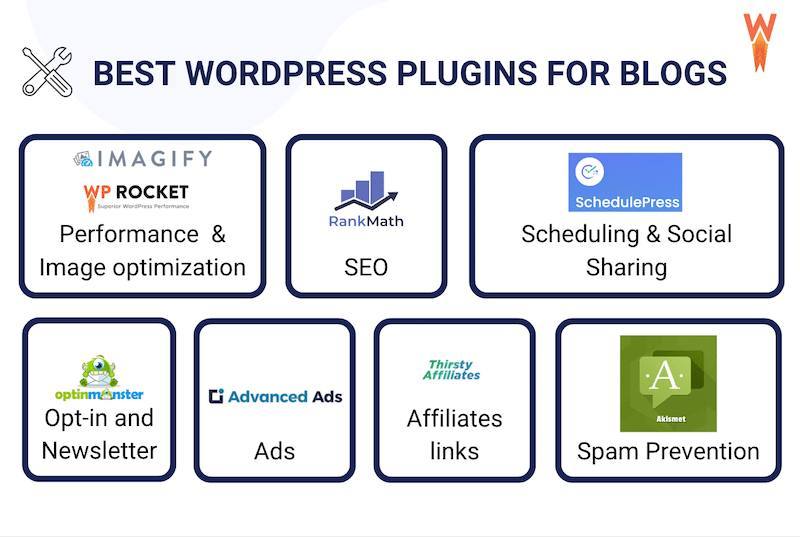
If you’re just starting, focus on plugins that cover core needs: SEO, security, forms, and speed. As you grow, add tools for analytics, social sharing, and monetization.
- Use Yoast SEO or Rank Math for search optimization.
- Install Akismet and Sucuri Security to protect your blog.
- Add WPForms for easy contact forms.
- Use Smush or WP Rocket for faster loading.
- Try MonsterInsights or Google Site Kit for analytics.
- Choose Elementor if you want custom page designs.
Avoid installing too many plugins. Each plugin should have a clear purpose. Always check reviews and update plugins regularly. Remove plugins you no longer need.
For advanced blogging, consider plugins like AffiliateWP, Pretty Links, or Mailchimp for WordPress to grow income and audience.

Credit: wp-rocket.me
Common Mistakes When Using WordPress Plugins
Beginners often make these mistakes:
- Installing too many plugins at once
- Not updating plugins, which leads to security risks
- Ignoring plugin ratings and reviews
- Forgetting to back up before installing new plugins
- Not checking compatibility with the WordPress version
Always test plugins before using them on a live site. If your site becomes slow or buggy, deactivate plugins one by one to find the problem.
Frequently Asked Questions
What Are The Best Free WordPress Plugins For Bloggers?
Some of the best free plugins are Yoast SEO, Akismet, WPForms Lite, Elementor, and Smush. These cover SEO, spam protection, contact forms, design, and speed.
How Many Plugins Should I Use On My WordPress Blog?
There is no fixed number, but most blogs work well with 10–20 plugins. Only install plugins you really need. Too many plugins can slow down your site and cause conflicts.
Can Plugins Make My WordPress Site Slow?
Yes, some plugins can slow your site, especially those with lots of features or poor coding. Use lightweight plugins and check your site speed with tools like Google PageSpeed Insights.
Are Paid Plugins Worth It For Bloggers?
Paid plugins offer advanced features, better support, and regular updates. For serious bloggers, paid plugins like WP Rocket or AffiliateWP can be a smart investment.
How Do I Update WordPress Plugins Safely?
Always back up your site before updating. Update plugins from your WordPress dashboard one at a time. If you notice any problems, deactivate the plugin and contact support.
Blogging is easier and more rewarding with the right WordPress plugins. By choosing wisely, you can improve your website, grow your audience, and make your blogging journey successful. For more in-depth plugin reviews and WordPress tips, visit WordPress Plugins Directory.


Credit: www.easywp.com