
Blogging has become one of the most popular ways to share ideas, build a brand, and even make money online. WordPress remains the top platform for bloggers because it is flexible, easy to use, and supports a huge range of plugins.
But with thousands of plugins available, it can be confusing to choose the right ones. The right plugins can help you write better posts, grow traffic, protect your site, and earn more. The wrong plugins can slow your website, cause problems, or make blogging harder.
This guide is designed for bloggers, freelancers, small business owners, and anyone using WordPress to publish content. You’ll learn which plugins are best for blogging, what features matter most, and how to avoid common mistakes. Each plugin is explained simply so even beginners can understand. You’ll also see practical comparisons, real examples, and expert recommendations to help you make smart choices. By the end, you’ll know exactly which tools can take your blog to the next level.
WordPress plugins are small programs that add new features to your website. For bloggers, plugins can do things like:
Plugins save time and make blogging easier. But too many plugins, or the wrong ones, can create problems. It’s better to use a few high-quality plugins than install everything you see.
When choosing plugins, keep these points in mind:
Many new bloggers forget to check plugin ratings and updates. This can lead to security risks or broken websites. It’s also common to install too many plugins, which can make your site slow. Always test new plugins on a staging site if possible.

Credit: www.reamaze.com
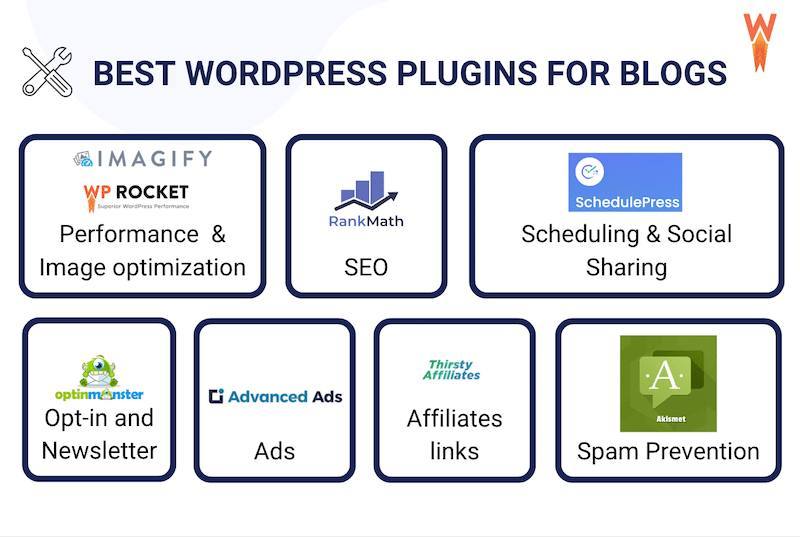
Let’s explore the essential plugins every blogger should consider. These plugins cover the most important blogging tasks, from SEO to security to content creation.
Yoast SEO is the most popular SEO plugin for WordPress. It helps you optimize your posts for Google, gives you clear suggestions, and makes technical SEO simple.
Features:
Pros:
Cons:
Pricing: Free, Premium starts at $99/year
Many bloggers miss the importance of readability scores. Yoast’s readability check helps you write posts that are easy for visitors to understand, which can boost time-on-site and SEO.
Spam comments can ruin your blog and waste your time. Akismet filters out spam automatically and keeps your comments section clean.
Features:
Pros:
Cons:
Pricing: Free for personal use, starts at $10/month for businesses
New bloggers often think spam isn’t a big problem, but as your site grows, spam can overwhelm you. Akismet solves this before it becomes an issue.
WPForms lets you create contact forms, surveys, and newsletter signups without coding. It’s one of the most user-friendly form plugins.
Features:
Pros:
Cons:
Pricing: Free (Lite), paid plans start at $39.50/year
A practical tip: Always add a contact form to your blog. It makes you look professional and encourages readers or brands to reach out.
Jetpack is a multi-purpose plugin from WordPress.com. It offers security, backups, site stats, and more in one package.
Features:
Pros:
Cons:
Pricing: Free, paid features start at $4/month
Jetpack’s site stats are basic but helpful for beginners. As your blog grows, consider using Google Analytics for deeper data.
MonsterInsights connects Google Analytics to your WordPress site. It makes tracking visitors simple and shows clear reports in your dashboard.
Features:
Pros:
Cons:
Pricing: Free, premium starts at $99.50/year
Many bloggers struggle with analytics setup. MonsterInsights solves this, so you can see which posts perform best and plan your content.
Rank Math is another popular SEO plugin. It’s newer than Yoast but offers more features for free.
Features:
Pros:
Cons:
Pricing: Free, Pro starts at $59/year
If you’re deciding between Yoast and Rank Math, use the comparison below:
| Feature | Yoast SEO | Rank Math |
|---|---|---|
| Free Keyword Optimization | 1 keyword | Multiple keywords |
| Schema Integration | Paid | Free |
| Readability Analysis | Included | Included |
| Ease of Use | Very Easy | Easy |
| Price (Premium) | $99/year | $59/year |
Elementor is a drag-and-drop page builder. It lets you design beautiful blog pages without coding.
Features:
Pros:
Cons:
Pricing: Free, Pro starts at $59/year
If you want your blog to stand out visually, Elementor is a good choice. Many bloggers use it to create custom landing pages or about pages.
Images can slow down your blog. Smush compresses images automatically so your site loads faster.
Features:
Pros:
Cons:
Pricing: Free, Pro starts at $60/year
Fast sites rank better in Google and keep visitors happy. Smush is a simple way to speed up your blog.
Backups are essential for every blogger. UpdraftPlus lets you schedule backups and restore your site easily if something goes wrong.
Features:
Pros:
Cons:
Pricing: Free, Premium starts at $70/year
Many new bloggers don’t think about backups until it’s too late. UpdraftPlus protects your work and saves stress.
Social sharing boosts traffic and helps your posts reach more people. Social Snap adds attractive sharing buttons and tracks shares.
Features:
Pros:
Cons:
Pricing: Free, Pro starts at $39/year
Social Snap is a smart way to increase post visibility and encourage readers to share your content.
Broken links hurt SEO and user experience. Broken Link Checker scans your site for bad links and helps you fix them.
Features:
Pros:
Cons:
Pricing: Free
Always fix broken links quickly. Google and visitors notice them, and it can lower your rankings.
Security is critical for any blog. Sucuri Security protects your site from hacks, malware, and attacks.
Features:
Pros:
Cons:
Pricing: Free, paid starts at $199.99/year
Sucuri is trusted by many large sites and is a must-have for bloggers serious about security.
Building an email list is key for bloggers. Mailchimp for WordPress helps you connect signup forms to Mailchimp and grow your list.
Features:
Pros:
Cons:
Pricing: Free, premium starts at $59/year
Email lists help you reach readers directly and are valuable for marketing.
If you want top speed for your blog, WP Rocket is a premium caching plugin. It makes your site load much faster and improves SEO.
Features:
Pros:
Cons:
Pricing: Starts at $59/year
WP Rocket is recommended for serious bloggers who want the best speed and performance.
If you need to add tables to your blog, TablePress makes it easy. You don’t need any coding skills.
Features:
Pros:
Cons:
Pricing: Free, premium extensions available
Bloggers use TablePress to compare products, list features, or share data.
Changing URLs or deleting posts can create broken links. Redirection helps you manage redirects so visitors and Google always find the right page.
Features:
Pros:
Cons:
Pricing: Free
Redirection is essential for maintaining SEO when updating your site structure.
Bloggers earning money from affiliate links need a tracking system. AffiliateWP helps you manage affiliate programs and track commissions.
Features:
Pros:
Cons:
Pricing: Starts at $149/year
AffiliateWP is recommended for bloggers with a monetization focus.
Pretty Links lets you shorten, track, and manage affiliate or marketing links. It makes links easy to share and remember.
Features:
Pros:
Cons:
Pricing: Free, Pro starts at $99/year
Pretty Links is useful for bloggers promoting products or tracking link clicks.
Google Site Kit connects Google tools (Analytics, Search Console, AdSense) directly to WordPress. It shows data in your dashboard.
Features:
Pros:
Cons:
Pricing: Free
Site Kit is helpful for bloggers who want all Google data in one place.
Planning is important for blogging. Editorial Calendar lets you schedule posts, drag and drop to rearrange, and see your content plan at a glance.
Features:
Pros:
Cons:
Pricing: Free
Editorial Calendar is great for bloggers who want to stay organized and publish regularly.
Here’s a quick overview of core features for the most popular blogging plugins:
| Plugin | SEO | Security | Speed | Forms | Price (Basic) |
|---|---|---|---|---|---|
| Yoast SEO | ✓ | Free | |||
| Jetpack | ✓ | ✓ | Free | ||
| WPForms | ✓ | Free | |||
| WP Rocket | ✓ | $59/year | |||
| Akismet | ✓ | Free |
To help you choose based on budget, here’s a comparison of plugin pricing:
| Plugin | Free Version | Paid Version Starting Price |
|---|---|---|
| Yoast SEO | Yes | $99/year |
| Rank Math | Yes | $59/year |
| WPForms | Yes | $39.50/year |
| Elementor | Yes | $59/year |
| WP Rocket | No | $59/year |
| AffiliateWP | No | $149/year |
If you’re just starting, focus on plugins that cover core needs: SEO, security, forms, and speed. As you grow, add tools for analytics, social sharing, and monetization.
Avoid installing too many plugins. Each plugin should have a clear purpose. Always check reviews and update plugins regularly. Remove plugins you no longer need.
For advanced blogging, consider plugins like AffiliateWP, Pretty Links, or Mailchimp for WordPress to grow income and audience.
Credit: wp-rocket.me
Beginners often make these mistakes:
Always test plugins before using them on a live site. If your site becomes slow or buggy, deactivate plugins one by one to find the problem.
Some of the best free plugins are Yoast SEO, Akismet, WPForms Lite, Elementor, and Smush. These cover SEO, spam protection, contact forms, design, and speed.
There is no fixed number, but most blogs work well with 10–20 plugins. Only install plugins you really need. Too many plugins can slow down your site and cause conflicts.
Yes, some plugins can slow your site, especially those with lots of features or poor coding. Use lightweight plugins and check your site speed with tools like Google PageSpeed Insights.
Paid plugins offer advanced features, better support, and regular updates. For serious bloggers, paid plugins like WP Rocket or AffiliateWP can be a smart investment.
Always back up your site before updating. Update plugins from your WordPress dashboard one at a time. If you notice any problems, deactivate the plugin and contact support.
Blogging is easier and more rewarding with the right WordPress plugins. By choosing wisely, you can improve your website, grow your audience, and make your blogging journey successful. For more in-depth plugin reviews and WordPress tips, visit WordPress Plugins Directory.

Credit: www.easywp.com
