
Laptops have become essential tools for work, study, and creativity. But on their own, laptops can feel limited—especially if you’re looking to boost your productivity. With the right accessories, you can turn your laptop into a powerful workstation that helps you do more in less time. Whether you’re a freelancer, remote worker, tech enthusiast, or small business owner, the right gear can make your workflow smoother, faster, and more comfortable.
This guide explores the best laptop accessories for productivity. It covers practical choices, product comparisons, key features, pricing, and how each accessory can help you work smarter. You’ll also find expert tips, non-obvious insights, and FAQs to help you make the best decision for your needs.
Let’s start with the basics. These accessories are must-haves for anyone who wants to get more done with their laptop.
Typing on a laptop keyboard can be tiring, especially for long hours. An external keyboard not only improves comfort but also increases typing speed and accuracy.
Non-obvious insight: Mechanical keyboards, even portable ones, offer tactile feedback that can reduce typing mistakes—something most beginners miss when using only laptop keyboards.
A wireless mouse is a simple upgrade, but it makes navigation faster and more precise than a laptop’s trackpad.
Tip: Look for mice with extra programmable buttons. Assign shortcuts for copy, paste, or switching windows for an instant productivity boost.
Working long hours on a laptop can cause neck and back pain. A laptop stand raises your screen to eye level, improving posture and reducing strain.
Example: The Rain Design mStand and Moft Invisible Stand are popular options among remote workers.
Modern laptops have fewer ports, which can be limiting. A USB-C hub or docking station connects multiple devices—external monitors, USB drives, SD cards, and more.
Non-obvious insight: Docking stations allow you to connect dual monitors, which increases screen space and lets you multitask more efficiently.
| Accessory | Key Features | Price Range | Best For |
|---|---|---|---|
| External Keyboard | Ergonomic, wireless, backlit | $20–$120 | Writers, coders |
| Wireless Mouse | Ergonomic, programmable buttons | $15–$80 | Designers, business users |
| Laptop Stand | Adjustable, portable, cooling | $20–$60 | Remote workers |
| USB-C Hub | Multiple ports, plug-and-play | $30–$200 | Multitaskers |
Once you have the essentials, consider these accessories to further boost your efficiency.
A second screen can double your workspace. An external monitor lets you compare documents side-by-side, keep communications open, or edit photos with more detail.
Practical advice: Don’t just buy the biggest monitor. Choose one with good color accuracy and adjustable height for long-term comfort.
A portable SSD offers fast, reliable storage. It’s much quicker than traditional hard drives, which means you can transfer files in seconds.
Beginner tip: Always check the read/write speeds. Many SSDs advertise high speeds but deliver less in real-world use.
Distractions ruin productivity. Noise-canceling headphones block out background noise, letting you focus even in busy environments.
Example: The Sony WH-1000XM5 and Bose QuietComfort 45 are top choices for remote workers.
If you attend online meetings or create content, a webcam and external microphone make a big difference. They provide clearer video and audio compared to built-in laptop hardware.
Non-obvious insight: External microphones also improve voice clarity for speech-to-text apps, boosting productivity for writers and bloggers.
| Accessory | Benefits | Typical Price | Recommended For |
|---|---|---|---|
| External Monitor | Double workspace, sharp visuals | $120–$500 | Designers, multitaskers |
| Portable SSD | Fast file transfers, backup | $60–$300 | Photographers, business users |
| Noise-Canceling Headphones | Distraction-free work | $60–$400 | Remote workers, students |
| Webcam & Microphone | Professional calls, clear audio | $70–$350 | Content creators, business |
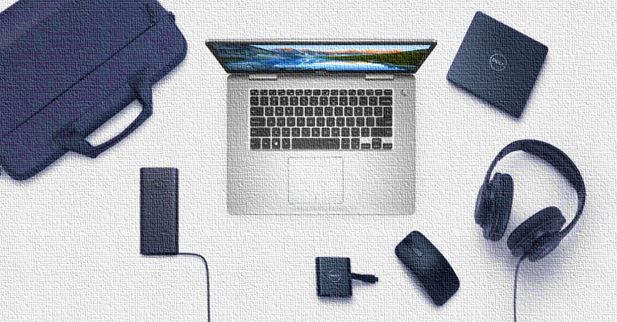
Credit: www.how2shout.com
Don’t overlook comfort. Working on a laptop for hours can cause health issues. These accessories help you stay comfortable and healthy.
A good ergonomic chair supports your back and helps you sit correctly. This reduces the risk of back pain and boosts focus.
Data point: According to the American Chiropractic Association, poor posture leads to decreased productivity and increased discomfort.
Proper lighting prevents eye strain. A desk lamp with adjustable brightness and color temperature makes it easier to work, especially in the evening.
Typing for long hours can cause wrist pain. A wrist rest provides support and keeps your hands in a neutral position.
Laptop screens emit blue light, which can cause eye fatigue. Blue light blocking glasses filter this light and make screen time safer.
| Accessory | Comfort Benefit | Price Range | Suitable For |
|---|---|---|---|
| Ergonomic Chair | Back support, posture | $120–$500 | All users |
| Desk Lamp | Eye comfort, adjustable light | $25–$80 | Night workers |
| Wrist Rest | Prevents wrist pain | $10–$30 | Typists |
| Blue Light Glasses | Reduces eye strain | $15–$60 | Frequent screen users |
If you work from different places, you need accessories that are portable and easy to use. Here are some smart choices for mobile productivity.
Running out of battery is a nightmare, especially on the go. A portable power bank gives you backup power for your laptop and other devices.
Tip: Always check if your power bank supports laptop charging. Not all do.
A privacy screen blocks others from viewing your laptop. This is useful in cafes, airports, or shared spaces.
Protect your laptop from scratches and impacts. A laptop sleeve or bag also makes carrying your accessories easier.
Stay connected anywhere with a mobile Wi-Fi hotspot. It gives you internet even where there’s no Wi-Fi.
Non-obvious insight: Some newer laptops have built-in eSIM support for direct mobile data without a hotspot device.

Credit: www.youtube.com
To help you choose, here’s a quick comparison of top-rated accessories in each category.
| Accessory | Top Product | Key Feature | Price | Pros | Cons |
|---|---|---|---|---|---|
| Keyboard | Logitech MX Keys | Comfort, backlit, wireless | $99 | Quiet, reliable | Heavy for travel |
| Mouse | Logitech MX Master 3 | Programmable, ergonomic | $89 | Long battery, smooth scroll | Large size |
| Monitor | Dell Ultrasharp U2720Q | 4K, color accuracy | $479 | Excellent visuals | Expensive |
| Headphones | Sony WH-1000XM5 | Noise canceling | $349 | Superb sound, comfort | High price |
| SSD | Samsung T7 Portable SSD | Fast, compact | $109 (1TB) | Speedy, durable | Needs USB-C port |
| USB-C Hub | Anker 7-in-1 Hub | Multiple ports | $39 | Affordable, reliable | Gets warm |
Choosing the right accessories depends on your work style and needs. Here are practical tips to help you decide:
Common mistakes: Many beginners buy accessories based only on price or looks. Always check compatibility with your laptop, read real user reviews, and consider the long-term value over short-term savings.
Laptop accessory prices vary depending on brand, features, and build quality. Here’s a brief pricing overview for the most popular categories:
Pro tip: Higher price doesn’t always mean better quality. Look for accessories with strong warranty policies and reputable reviews.
For more in-depth data on laptop accessory trends, check out this resource: Statista Laptop Market Insights.
The most important accessories are an external keyboard, wireless mouse, and laptop stand. These improve comfort, speed, and ergonomics. USB-C hubs are also vital for connecting multiple devices.
Start by listing your needs: comfort, connectivity, storage, or mobility. Check compatibility with your laptop’s ports and operating system. Read user reviews and compare features, not just prices.
Not always. Many affordable accessories deliver great performance. Focus on build quality, warranty, and real-world reviews. Sometimes, mid-range products offer the best value.
For remote work, use noise-canceling headphones, external monitor, USB-C hub, and a mobile Wi-Fi hotspot. These help you stay focused, connected, and efficient outside the office.
Yes. Accessories like laptop stands and sleeves help prevent overheating and physical damage. Using a power bank or surge protector also reduces battery wear and protects against power issues.

Credit: solid-me.com
The right laptop accessories can transform your everyday work experience. They help you stay comfortable, organized, and efficient—whether at home, in the office, or on the move. Invest in quality gear that matches your workflow and needs. Remember, productivity isn’t just about working faster; it’s about working smarter.
With these accessories, your laptop becomes a true powerhouse for getting things done.
