
Artificial intelligence is changing how people create content. Today, AI tools for content creation help writers, marketers, designers, and even small business owners do more in less time. If you want to write blogs, design images, edit videos, or manage social media, AI can make your work easier and faster. But with so many tools available, it’s easy to feel lost. Which tools are best? What can they really do? How do you avoid common mistakes? This guide explains everything you need to know, showing how AI tools can help you create better content, save time, and stay ahead in a competitive world.
AI tools for content creation are software programs that use artificial intelligence to help people make digital content. This content can be blog posts, articles, social media updates, images, videos, audio, and much more. These tools use smart technology—like machine learning, natural language processing, and computer vision—to understand data and help you produce high-quality work quickly.
For example, an AI writing tool might turn a simple idea into a full blog post. An AI image generator can create custom graphics from a short description. Video editors powered by AI can cut, trim, and even add captions automatically.
These tools can help both beginners and professionals.
There are two big reasons. First, digital content is everywhere—websites, social media, emails, and more. Second, people expect fresh, interesting content all the time. Without help, it’s almost impossible to keep up. AI tools give you an edge by speeding up boring tasks and helping you focus on creativity and strategy.
Different tools serve different needs. Here are the main categories:
Let’s look at each type in detail, with examples and what makes them special.
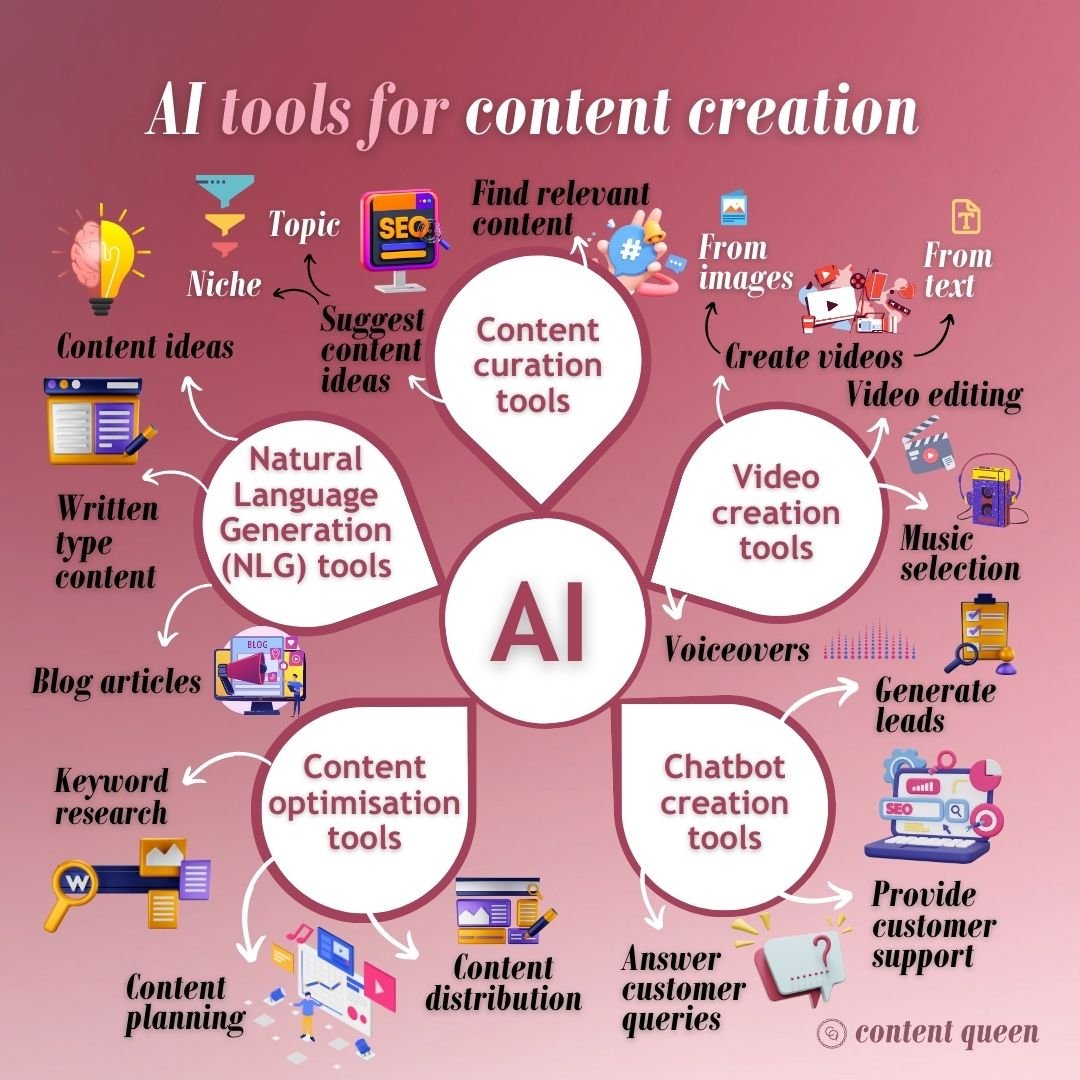
Credit: www.contentqueenmariah.com
AI writing tools are some of the most popular content creation helpers today. They do much more than just correct grammar or spelling mistakes.
Some popular examples are Jasper, Writesonic, Copy.ai, and Grammarly. These tools use large language models trained on millions of texts. You enter a topic or a few keywords, and the tool generates a draft for you.
You can enter “How to grow tomatoes at home” into Jasper, and in seconds, get a 500-word draft. You can then edit, add your own style, and publish. This process could take an hour or more by hand.
| Tool | Main Feature | Best For | Free Plan |
|---|---|---|---|
| Jasper | Long-form content | Bloggers, agencies | No |
| Copy.ai | Short copywriting | Marketers, small businesses | Yes |
| Writesonic | SEO-friendly drafts | Startups, content teams | Yes |
| Grammarly | Grammar checking | Everyone | Yes |
AI image generators turn words into pictures. You write a prompt, such as “A cat riding a bicycle in Paris,” and the tool creates a unique image.
These tools use machine learning models trained on millions of images and captions. They can produce everything from realistic photos to fantasy art.
Many beginners do not realize that the prompt quality matters as much as the tool. A clear, detailed prompt gives much better results than a short, vague one.
Video content is powerful but time-consuming to make. AI video tools help with editing, scriptwriting, and even animation.
Popular tools include Descript, Synthesia, Lumen5, and Pictory.
| Tool | Main Feature | Best Use | Free Version |
|---|---|---|---|
| Descript | Text-based video editing | Podcasts, interviews | Yes |
| Synthesia | AI avatar videos | Tutorials, training | No |
| Lumen5 | Blog-to-video | Social media, news | Yes |
| Pictory | Short video highlights | Marketing, recaps | Yes |
You can paste a webinar transcript into Descript and quickly cut out filler words (“um,” “uh”), add automatic captions, and export a clean video—all in minutes.
Many users skip manual review after AI editing. Always check the final video for errors, as AI can sometimes miss context or make odd cuts.
Audio content, such as podcasts and audiobooks, is growing fast. AI tools can save hours of work by handling:
Examples include Otter.ai, Auphonic, Resemble AI, and Adobe Podcast.
Many audio AI tools are now good enough to handle multiple speakers and accents. This means more accurate transcriptions, but always check for mistakes in names and technical terms.
Search engine optimization is key for content creators who want their work to be found online. AI SEO tools can:
Surfer SEO, Frase, MarketMuse, and SEMrush have added AI features to help you plan and improve content.
You can enter your article into Surfer SEO, and it will show a list of keywords to add, how many times to use them, and what topics your competitors cover.
Don’t just copy all AI suggestions. Use them as a guide, but keep your content clear and helpful for readers.
Managing social media is hard work. AI tools make it easier to:
Popular tools include Lately.ai, Buffer with AI Assist, and SocialBee.
AI-powered social media tools can help you keep a consistent voice across platforms. But always add your own touch—people follow accounts for personality, not just perfect grammar.
Credit: www.zegocloud.com
Design is no longer just for experts. AI design tools can help you create:
Canva, Visme, and Looka offer AI-powered design suggestions, templates, and even brand color selection.
Canva’s Magic Design lets you upload some text or photos and instantly see many layout ideas. You can pick one and customize it in minutes.
With so many choices, picking the right tool can be tough. Here’s how to decide:
| Factor | Why It Matters | What to Check |
|---|---|---|
| Accuracy | High-quality outputs save editing time | Sample results, user reviews |
| Integration | Works with your platforms (WordPress, YouTube, etc.) | API, plugin availability |
| Pricing | Fits your budget as you scale up | Monthly costs, free plans |
| Support | Help when you get stuck | Live chat, tutorials |
Many users pay for expensive tools with lots of features but only use a few. Start with what you need and upgrade as you grow.
AI content tools are not just for big brands. Small business owners, solo creators, and even students are using these tools with great results.
These examples show that AI content tools can help almost anyone work faster and smarter.
AI content tools are powerful, but they also raise important questions.
AI writing tools can sometimes create content too close to existing sources. Always check for plagiarism and add your own insights.
Some AI image generators use data from across the internet. You may not have full rights to sell or use these images commercially. Always read the terms and conditions.
AI video and audio tools can create realistic fake voices and images. Use these tools responsibly and never mislead your audience.
AI tools often require access to your data or content. Choose reputable companies and check their privacy policies.
For more on AI ethics and copyright, see Wikipedia: AI Ethics.
Credit: futureskillsacademy.com
The field is moving fast. Here’s what to expect:
The best tools depend on your needs. For writing, Jasper and Copy.ai are popular. For images, try DALL-E or Canva. For video, Descript and Lumen5 are top picks. Test a few to see which fits your workflow best.
No. AI can help with drafts, ideas, and simple designs, but human creativity, judgment, and style are still needed. Use AI to save time on routine tasks and focus your energy on creative work.
It depends. Some tools offer full commercial rights, but others do not. Always check the tool’s license terms. Also, check for plagiarism and avoid sensitive or trademarked topics.
Prices vary widely. Many tools offer free versions with limits. Paid plans can range from $10 to $100+ per month, depending on features and usage. Always start with a free trial if possible.
Many beginners trust AI outputs too much. Always review and edit the content, check facts, and add your own ideas. AI is a helper, not a replacement for quality control.
Content creation is changing fast, and AI tools for content creation are at the center of this shift. Whether you’re a writer, marketer, designer, or business owner, these tools can make your work easier and more effective. The key is to pick the right tool for your needs, learn how to use it well, and never forget the value of your unique human touch. The best results come when you and AI work together—combining speed and creativity to make great content every time.
