
Finding good customers is one of the biggest challenges for any business. With so much competition, you need ways to reach the right people at the right time. This is where lead generation tools can make a huge difference. These tools help you attract, capture, and manage potential customers, making your sales process more effective and your business more profitable.
But with hundreds of options out there, how do you know which tools really work? In this guide, you’ll discover the best lead generation tools in 2024. We’ll look at what makes each tool special, how much they cost, their main features, and the real results they deliver.
Whether you’re a small startup or a growing company, you’ll find something here that fits your needs and budget.
Let’s dive in and see how the right lead generation tool can help you turn strangers into loyal customers.
A lead generation tool is software or a platform designed to collect contact information from people who might be interested in your product or service. This information is called a “lead.” It can be as simple as a name and email address or as detailed as a phone number, company, and job title.
These tools help you:
Without these tools, you might waste time chasing people who are not interested. The right tool helps you save time and grow your business faster.
The way people buy products and services has changed. Customers do research online, compare options, and often reach out to several companies before making a decision. If you’re not using digital tools, you’re missing out on many opportunities.
Here’s why lead generation tools are important:
An insight many beginners miss: Not all leads are equal. A good tool helps you spot which leads are “warm” (ready to buy soon) and which need more nurturing.
Credit: adoric.com
Not every tool will fit your business perfectly. Before you choose, look for these features:
A common mistake: Picking a tool with too many features you won’t use. Start with what you need now, and scale up as you grow.
Below is a selection of the best lead generation tools, each offering unique features. We’ll cover their pros and cons, pricing, and who they’re best for.
HubSpot is one of the most popular all-in-one marketing platforms. It offers tools for lead capture, email marketing, CRM, and automation.
Main Features:
Pricing: Free plan available; paid plans start at $50/month.
Pros:
Cons:
Real-World Use Case: A small software company uses HubSpot to capture leads from its website and automatically sends a welcome email. Sales reps get notified when a lead opens the email, allowing fast follow-up.
LinkedIn Sales Navigator is a powerful tool for B2B lead generation. It helps you find and connect with decision-makers at the companies you want to target.
Main Features:
Pricing: Starts at $99.99/month.
Pros:
Cons:
Real-World Use Case: A consulting agency uses Sales Navigator to find marketing managers in target industries, sends personalized messages, and schedules demos.
OptinMonster is a top tool for turning website visitors into leads using pop-ups, floating bars, and slide-ins.
Main Features:
Pricing: Starts at $16/month.
Pros:
Cons:
Real-World Use Case: An e-commerce store uses OptinMonster pop-ups to offer discounts in exchange for emails, growing their list by 20% in three months.
Leadpages helps you create high-converting landing pages and forms without coding.
Main Features:
Pricing: Starts at $49/month.
Pros:
Cons:
Real-World Use Case: A fitness coach uses Leadpages to offer a free eBook download. Leads go straight to her email list for follow-up.
Intercom provides live chat and chatbot tools to capture leads right from your website.
Main Features:
Pricing: Starts at $74/month.
Pros:
Cons:
Real-World Use Case: A SaaS company uses Intercom chatbots to answer questions and collect emails from interested visitors, increasing demo bookings by 30%.
Pipedrive’s LeadBooster adds lead generation tools to their popular sales CRM.
Main Features:
Pricing: LeadBooster add-on starts at $32.50/month (requires Pipedrive CRM).
Pros:
Cons:
Real-World Use Case: A real estate agency uses LeadBooster to capture website leads and assign them to agents automatically.
Unbounce focuses on creating and testing landing pages for maximum conversions.
Main Features:
Pricing: Starts at $90/month.
Pros:
Cons:
Real-World Use Case: A digital marketing agency uses Unbounce to run A/B tests on different offers, improving conversion rates for clients.
Hunter. io helps you find and verify business email addresses for outreach.
Main Features:
Pricing: Free plan; paid plans start at $49/month.
Pros:
Cons:
Real-World Use Case: A recruitment firm uses Hunter.io to find emails of potential candidates, saving hours each week.
Sumo offers free and paid tools to grow your email list with pop-ups and smart bars.
Main Features:
Pricing: Free; Pro starts at $39/month.
Pros:
Cons:
Real-World Use Case: A blogger uses Sumo to add pop-ups, growing her list from 100 to 800 subscribers in six months.
Drift is a conversation-driven marketing tool with advanced chatbots and live chat for B2B businesses.
Main Features:
Pricing: Custom pricing; starts around $250/month.
Pros:
Cons:
Real-World Use Case: A software company uses Drift to qualify leads with AI bots and book sales calls automatically.
Here’s a quick comparison of top tools, their main features, and pricing:
| Tool | Main Feature | Best For | Starting Price (per month) |
|---|---|---|---|
| HubSpot | All-in-one platform, automation | Most businesses | Free/$50 |
| LinkedIn Sales Navigator | B2B prospecting | B2B sales teams | $99.99 |
| OptinMonster | Pop-ups & forms | Websites & blogs | $16 |
| Leadpages | Landing pages | Marketers, coaches | $49 |
| Intercom | Live chat & bots | SaaS, support teams | $74 |
| Pipedrive LeadBooster | Multi-channel lead capture | Sales teams | $32.50 (add-on) |
| Unbounce | Landing page optimization | Agencies, marketers | $90 |
| Hunter.io | Email finding | Outreach, recruiters | Free/$49 |
| Sumo | Email list building | Bloggers, small sites | Free/$39 |
| Drift | Conversational marketing | B2B, SaaS | $250+ |
Let’s look at the strengths and weaknesses of each tool side by side:
| Tool | Pros | Cons |
|---|---|---|
| HubSpot | Easy to use, all-in-one, great support | Can get expensive, learning curve for advanced features |
| LinkedIn Sales Navigator | Huge network, advanced targeting | High cost, not for B2C |
| OptinMonster | Powerful pop-ups, good targeting | Full features cost extra, can overwhelm beginners |
| Leadpages | Quick setup, mobile friendly | Limited CRM features, basic customization on lower plans |
| Intercom | Live chat, automation | Can get expensive, not for outreach |
| Pipedrive LeadBooster | Integrated with CRM, multi-channel | Requires main subscription, not for beginners |
| Unbounce | Highly customizable, AI features | Pricey, learning curve |
| Hunter.io | Accurate, quick email finding | Only finds public emails, limited automation |
| Sumo | Free option, easy for beginners | Branding on free plan, basic features |
| Drift | AI chatbots, strong automation | Expensive, some features behind paywall |
Choosing the best tool depends on your business type, goals, and budget. Here’s how to decide:
Expert tip: The tool itself won’t fix a weak offer or poor website. Make sure your landing pages, emails, and calls-to-action are strong, or even the best tool won’t deliver results.
Seeing how businesses use these tools can help you decide which fits best.
One insight beginners miss: Using two or three tools together often gets better results than relying on just one.

Credit: www.youtube.com
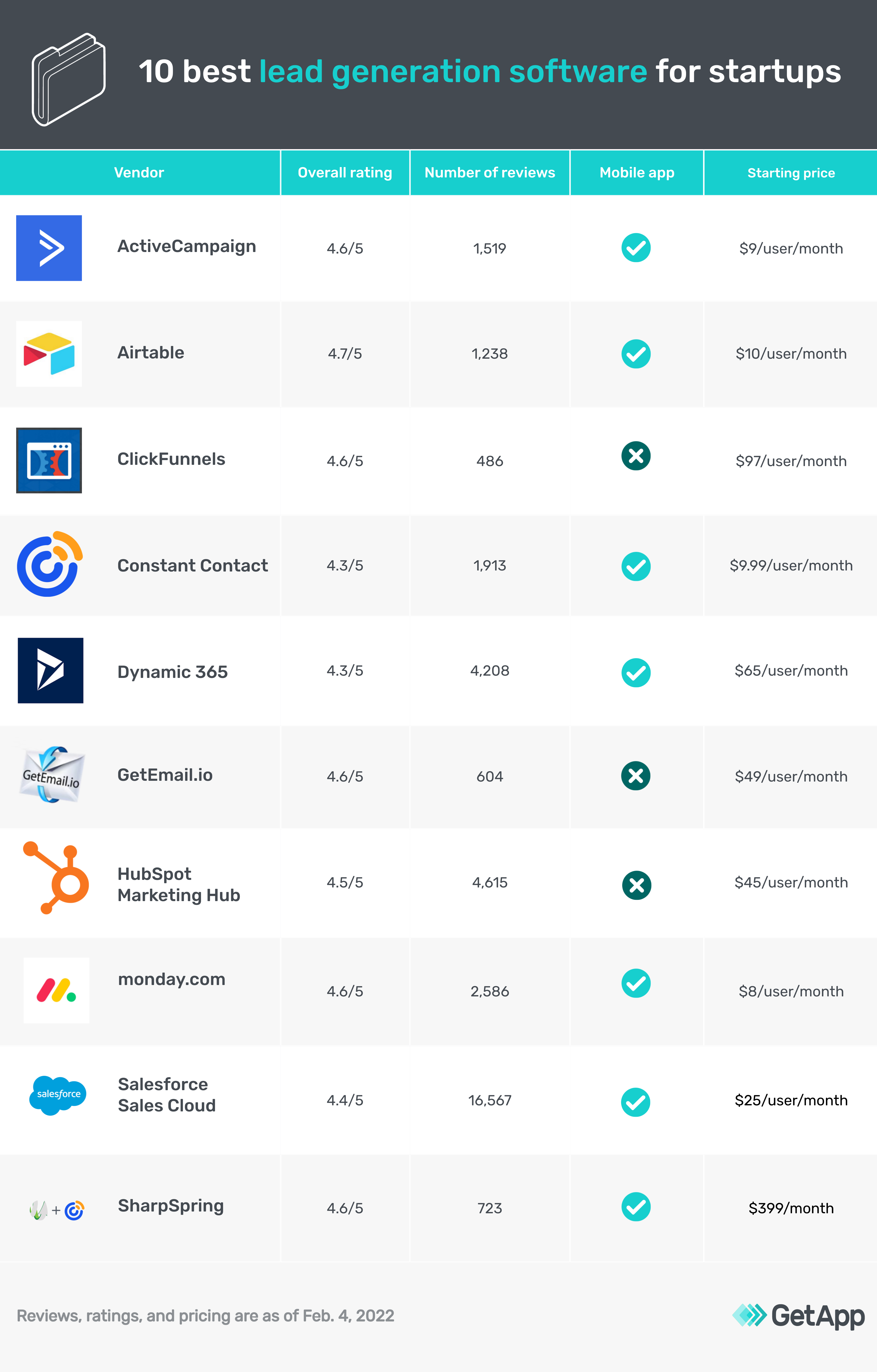
Here’s a closer look at pricing models for popular tools:
When choosing, watch for hidden costs like add-ons or required subscriptions.
A mistake many new users make: Sending generic emails to every lead. Personalization leads to much higher conversions.
These numbers show why investing in the right tool pays off.
For more on lead generation best practices, see this HubSpot guide.
Credit: www.getapp.com
Lead generation tools help you find, capture, and organize contact information from people interested in your business. They automate tasks like form collection, email follow-up, and lead scoring, saving time and increasing sales opportunities.
Yes. Even a simple pop-up or form can grow your email list and bring in new clients. Many tools offer free or low-cost plans, so you can start small and upgrade as your business grows.
High-quality leads usually match your target customer profile, show interest (like downloading a guide or booking a demo), and respond to your messages. Tools with lead scoring help you spot these.
Absolutely. Many businesses use a mix—like a landing page tool plus an email finder or a chatbot plus a CRM. Just make sure your tools integrate well to avoid duplicate work.
A CRM (Customer Relationship Management) tool helps you manage your relationships with leads and customers. Lead generation tools focus on finding and capturing new leads. Most businesses use both together for best results.
Finding the right lead generation tool is a game-changer for growing your business. Choose the tool—or combination—that fits your goals, budget, and team size. Test, analyze, and improve. The right system will help you stop chasing cold leads and start building a steady stream of new customers.
